
What is DNS? The Domain Name System Explained
Quick answer
DNS — the Domain Name System — is the global directory that translates human-readable names like example.com into the IP addresses computers actually use. A DNS lookup walks a hierarchy: the recursive resolver asks the root, the TLD, then the authoritative nameserver for the zone. Caching at every step makes the system fast; TTL controls how long each cached answer lives. This guide covers resolution, the DNS hierarchy, caching and TTLs, server types, security, and how DNScale fits in.
On this page
What you'll learn
- Understand what DNS is and why it exists
- Learn how DNS resolution works step by step
- Know the key components of the DNS hierarchy
- Understand how DNScale provides fast, reliable DNS hosting
The Domain Name System (DNS) is a fundamental part of how the internet works, but it's often overlooked by everyday users. DNS acts as the internet's address book, translating human-friendly domain names like dnscale.eu into the numerical IP addresses that computers use to identify each other on the network.
Why Do We Need DNS?
Every device connected to the internet has a unique IP address. While computers communicate using these addresses, remembering a string of numbers for every website would be impossible for most people. DNS solves this problem by allowing us to use easy-to-remember domain names instead of IP addresses.
How Does DNS Work?
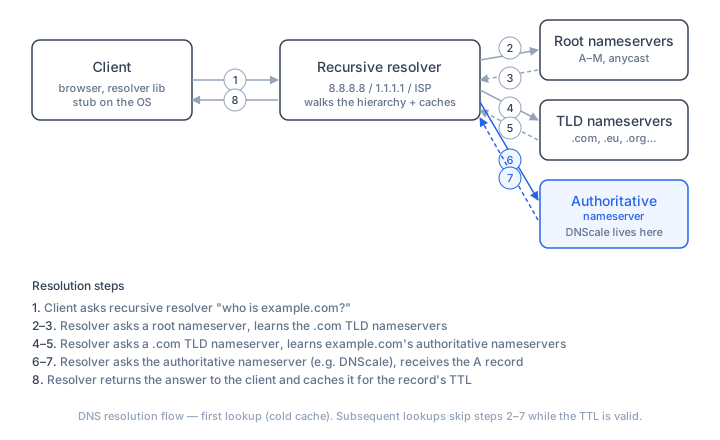
When you enter a website address into your browser, DNS gets to work behind the scenes:
- DNS Query Initiation: Your device asks a DNS resolver for the IP address associated with the domain name.
- Recursive Lookup: If the resolver doesn't already know the answer, it queries a series of DNS servers, starting with the root server, then the top-level domain (TLD) server (like
.com), and finally the authoritative name server for the domain. - Response: The resolver returns the correct IP address to your device, which then connects to the website.
For warm caches this often happens in milliseconds; cold lookups take more network round trips but are still fast enough that users rarely notice DNS as a separate step.
The full resolution walkthrough
A cold lookup — one where no cache holds the answer — makes multiple round trips:
- Client → Stub resolver. The browser hands the name to the operating system's stub resolver (part of the standard C library on Unix, or the DNS Client service on Windows).
- Stub → Recursive resolver. The stub sends a UDP packet to the configured recursive resolver (e.g.,
8.8.8.8for Google Public DNS, or the ISP's resolver). - Recursive → Root. The recursive resolver asks a root nameserver: "Who handles
.com?" There are 13 root server identities (A through M), each an anycast cluster distributed worldwide. - Root → Recursive. The root returns a referral: the NS records and glue A/AAAA records for the
.comTLD nameservers. - Recursive → TLD. The resolver now asks a
.comTLD nameserver: "Who handlesexample.com?" - TLD → Recursive. The TLD returns the authoritative nameservers for
example.com. - Recursive → Authoritative. The resolver queries one of the authoritative nameservers for the specific record (e.g., the A record for
www.example.com). - Authoritative → Recursive → Stub → Client. The IP address travels back up the chain.
Every hop adds latency, but caching short-circuits most of them for subsequent queries. A warm-cache lookup returns in single-digit milliseconds because only hop 2 is needed.
Types of DNS Servers
Recursive resolvers
These servers receive DNS queries from client machines and are responsible for tracking down the correct IP address. They walk the hierarchy on the client's behalf and cache results. Most users get their recursive resolver from their ISP; alternatives include public resolvers like Google Public DNS (8.8.8.8), Cloudflare (1.1.1.1), and Quad9 (9.9.9.9).
Root nameservers
The first step in resolving a name. There are 13 logical root server identities (A through M), each operated by a different organisation (Verisign, ICANN, USC-ISI, RIPE NCC, etc.) and each deployed as a globally-distributed anycast cluster. They don't store zone data for individual domains — they only serve the root zone, pointing to TLD nameservers.
TLD nameservers
Responsible for storing information about domains with specific extensions, like .com, .net, .eu, .org. When the root returns a referral, the resolver queries the appropriate TLD nameserver to find which authoritative nameservers handle a specific second-level domain.
Authoritative nameservers
These servers contain the actual DNS records for a zone — A, AAAA, MX, CNAME, TXT, and everything else. They are the source of truth. When you update a DNS record, the change is made at the authoritative nameserver; recursive resolvers learn about it on their next lookup after the cached TTL expires.
The DNS Hierarchy
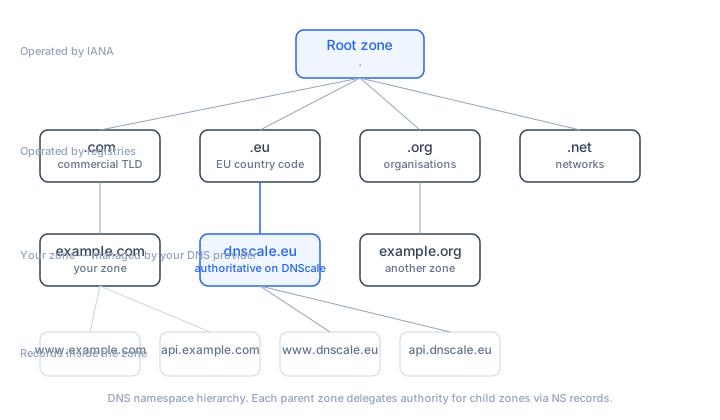
DNS is a tree. Understanding its structure helps explain why resolution works the way it does.
. (root)
├── .com
│   ├── example.com
│   │   ├── www.example.com
│   │   └── mail.example.com
│   └── another.com
├── .eu
│   ├── dnscale.eu
│   └── europa.eu
├── .org
└── .net
How delegation works
Each level of the tree delegates authority to the level below it:
- The root zone delegates
.comto the .com TLD nameservers (operated by Verisign). - The .com TLD delegates
example.comto the authoritative nameservers specified in the domain's NS records. - The
example.comzone can further delegatesubdomain.example.comto a different set of nameservers (or keep it in the same zone).
This delegation chain is verified during every DNSSEC validation, which is why the hierarchy matters beyond just resolution — it's also the trust model.
Delegation records
When a parent zone delegates a child zone, it stores two types of records:
- NS records — list the hostnames of the child's nameservers (e.g.,
ns1.dnscale.eu,ns2.dnscale.eu). - Glue records — A/AAAA records for those nameserver hostnames. These are necessary when the nameserver hostname is inside the child zone itself (e.g.,
ns1.example.comfor theexample.comzone). Without glue, a resolver would hit a circular dependency: need to resolvens1.example.comto ask the nameserver that servesexample.com.
For further reading on how zones are structured, see what is a DNS zone.
DNS Caching and TTL
Caching is what makes DNS fast and scalable. Without it, every single web request would require a multi-hop lookup across the internet — the system would collapse under the load.
For a dedicated beginner walkthrough of browser, OS, resolver, and negative cache layers, see DNS Cache Explained.
Where caching happens
| Cache layer | Typical duration | Controlled by |
|---|---|---|
| Browser DNS cache | Seconds to minutes (varies by browser) | Browser implementation |
| Operating system stub cache | The record's TTL, or OS-configured minimum | OS (e.g., systemd-resolved, mDNSResponder) |
| Recursive resolver cache | The record's TTL, capped by resolver policy | The resolver operator (ISP, public DNS) |
| TLD-level cache | TTL of the NS records in the parent zone | Domain's registrar / registry |
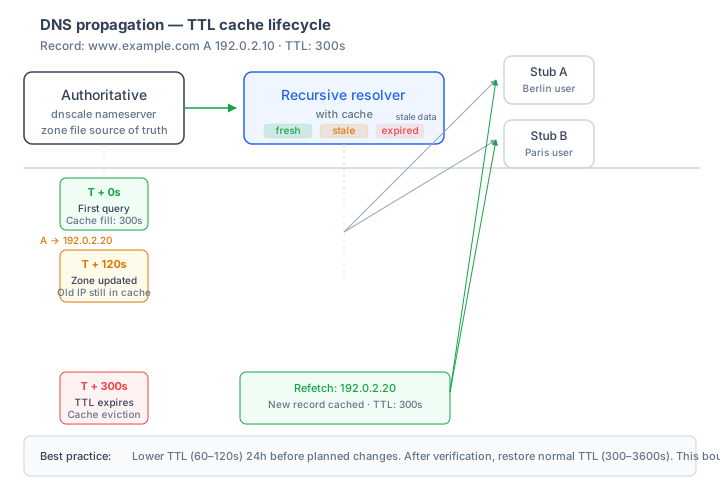
When you change a DNS record, the old value lives in every one of these caches until the TTL expires. This is what people mean by "DNS propagation" — it's not a push, it's a cache-expiry-driven pull.
How TTL works
The Time To Live (TTL) on a DNS record tells every cache: "you can keep this answer for up to X seconds before you must ask the authoritative server again."
- Low TTL (30–300s): Records change often, or you expect a change. Lower TTL means faster propagation (the stale-data window is smaller) but more query load on the authoritative server.
- High TTL (3600–86400s): Records are stable. Lower query load, higher cache hit rates, but changes take up to the TTL value to propagate.
TTLs for NS records (delegation) are set at the registrar and are typically 86400s (24h). This is why nameserver changes can take a day to propagate — you can't lower the NS TTL from your DNS provider's dashboard; you do it at the registrar.
Negative caching
When a resolver queries for a name that doesn't exist (NXDOMAIN), it also caches the absence of that name. The duration is governed by the SOA record's MINIMUM field — typically 300–3600 seconds. This prevents attackers from flooding resolvers with requests for non-existent names, but it also means a newly-created subdomain may be temporarily invisible.
DNS and Website Performance
A fast and reliable DNS service is crucial for website performance. Slow DNS lookups can delay page loads, while DNS outages can make websites inaccessible. DNScale is designed to provide secure, high-performance authoritative DNS so resolvers can reach your services consistently.
Why Choose DNScale for DNS?
- Speed: Optimized infrastructure for lightning-fast DNS resolution.
- Reliability: Redundant systems and global coverage to keep your domains online.
- Security: Advanced protection against DNS-based threats.
- Scalability: Easily manage DNS for a single domain or thousands, all from one platform.
Conclusion
DNS is the backbone of the internet, making it possible for users to access websites and services with simple, memorable names. With DNScale, you get a DNS solution that's fast, secure, and built for the demands of modern web applications.
Frequently asked questions
- What is DNS in simple terms?
- DNS is the internet's address book. It maps domain names like example.com to the numeric IP addresses computers use to communicate. Without DNS you'd have to remember a string of digits for every website you visit.
- How long does a DNS lookup take?
- A cold lookup that has to walk the full hierarchy (root → TLD → authoritative) typically completes in tens to a few hundred milliseconds. Once the answer is cached at any level - operating system, recursive resolver, or browser - subsequent lookups return in single-digit milliseconds until the TTL expires.
- What is the difference between authoritative and recursive DNS?
- An authoritative nameserver holds the actual records for a zone - it's the source of truth. A recursive resolver does the legwork on behalf of a client: it walks the hierarchy, caches answers, and returns a final result. End users almost always talk to recursive resolvers; authoritative servers are queried by the resolvers, not directly.
- Why does my DNS change take time to apply?
- Because of caching. Recursive resolvers worldwide cache the old answer for as long as the record's TTL says they can. Until those caches expire, some users will still see the old answer. Lowering TTL 24-48 hours before a planned change shortens the propagation window.
- Is DNS secure?
- Plain DNS is not authenticated and not encrypted by default. DNSSEC adds cryptographic signatures so resolvers can verify answers haven't been tampered with. DNS over HTTPS (DoH) and DNS over TLS (DoT) encrypt the query channel between client and resolver. Modern DNS deployments combine all three.
Inspect the DNS records for your domain
Check public DNS answers alongside the commands in this guide. Online checks do not measure your device’s local DNS path.
Open DNS lookup