
Dynamic DNS for your own domain, included in every plan
Keep a hostname on your own domain updated as your IP changes. DNScale DDNS supports IPv4 and IPv6, with scoped credentials and no separate subscription.
A home server, a small office VPN or a personal project can keep the same name even when its internet connection gets a new IP address. Dynamic DNS lets an updater on your device report that change and keep its DNS records current.
DNScale now includes basic Dynamic DNS in every plan, including Free and Pay
As You Go. Use a hostname on a domain you already manage in DNScale, such as
home.example.com, with your existing zone, record and query allowances. There
is no separate DDNS subscription.
Keep using your own hostname
DDNS updates existing A records for IPv4 and AAAA records for IPv6. An updater can send either family or both in one request. Sending only IPv4 leaves the IPv6 record in place, and vice versa.
The update keeps your record's TTL and private comments. It leaves other hostnames and record types, such as MX and TXT, untouched. Setup can create missing address records for you, using the same allowances as the rest of your zone. Each selected address type must have exactly one enabled value.
This fits services on changing connections: a VPN endpoint, a development machine or a home lab can use a name you control without asking you to edit a record every time the connection changes.
Give the updater a dedicated credential
In the zone dashboard, select Enable Dynamic DNS. Choose an existing
hostname or enter a short name such as home; the zone suffix is added for you.
Choose IPv4, IPv6 or both and supply an initial address for any missing record.
Setup creates those records and issues a credential. The credential ID is the updater's
username; its secret is the password. Save the secret when it appears—it is
shown once.
The credential only authorizes updates to that hostname's selected address types. Your device does not need your DNScale account password or a general API key. Updates also depend on the issuing user retaining write access to the zone.
You can revoke the credential from the dashboard. Revocation stops future updates and leaves the existing DNS records in place. If you lose the secret or replace the device, revoke the old credential and create a new one. One active credential is allowed per hostname.
See when the updater last checked in
The Dynamic DNS card shows the last successful check-in and the last address change separately. A request that confirms an unchanged address counts as a successful check-in without causing another DNS write.
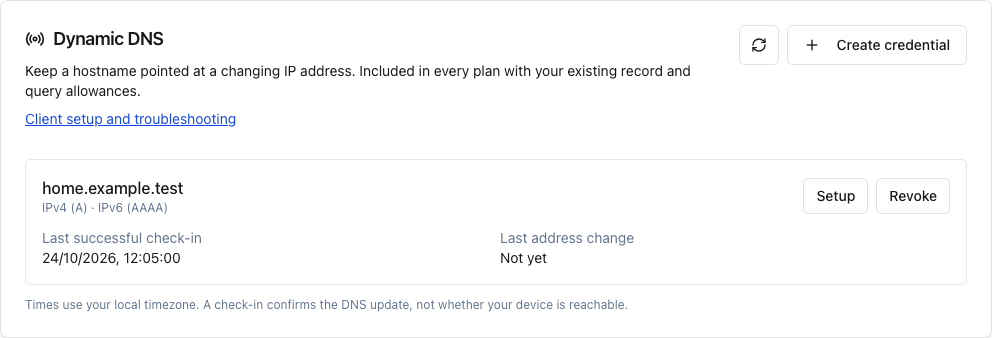
These timestamps describe updater activity. They do not measure whether your server is online or reachable. Clients such as ddclient may skip requests when the address has not changed, so a quiet dashboard can be normal.
Use ddclient or a custom router provider
The HTTPS update endpoint is:
https://api.dnscale.eu/nic/updateIt supports the DynDNS-compatible update format and dedicated HTTP Basic credentials. The dashboard provides a ddclient configuration template for the address families you selected. Replace the secret placeholder, protect the configuration file and run the updater on the device whose address you want to publish.
Our setup guide includes curl checks, ddclient configuration, and custom-provider examples for FRITZ!Box and OpenWrt. We tested ddclient 4.0.0 over verified HTTPS for IPv4, IPv6 and dual stack. The router request formats have automated tests; physical firmware testing remains outstanding, and available settings vary by router version. Use a custom provider where supported—DNScale is not automatically added to provider menus.
Use a five-minute check interval and one updater per hostname. Requests for the same credential less than 30 seconds apart are rate limited. For dual stack, ddclient can send both addresses together.
Get started from your zone
- Open an active primary zone in DNScale using an account with write access.
- Find Dynamic DNS and select Enable Dynamic DNS. Choose or enter a hostname.
- Select the address types, enter any missing initial addresses, and save the issued secret.
- Configure your updater, send a test update and check the dashboard status.
DNS caches still honor the existing TTL; the supported minimum is 300 seconds. DDNS also does not open firewall ports or bypass carrier-grade NAT. Your service needs a reachable network path and its own access controls.
Start with the Dynamic DNS setup guide. The API reference explains the parameters, response codes and retry behavior, and the pricing page shows your existing allowances.
Managed authoritative DNS
Run DNS with observability built in
Start free, then move to Scale or custom plans when you need DNS traffic alerts, higher query volume, and dedicated human support.