
Types of DNS Servers Explained
Quick answer
DNS resolution involves four kinds of servers, each with one job. The stub resolver on your device asks a recursive resolver. The recursive resolver asks the root nameservers, then the TLD nameservers (.com, .eu, etc.), then the authoritative nameserver for the zone. Authoritative servers hold the actual records — everything else is just walking the tree to find them. Caches at every level make this fast in practice.
On this page
What you'll learn
- Understand the four main types of DNS servers and their roles in query resolution
- Follow the complete DNS resolution path from stub resolver to authoritative server
- Use dig to query different server types and trace the resolution process
- Distinguish between recursive resolvers, forwarders, and authoritative servers
The Domain Name System (DNS) is a critical part of the internet's infrastructure, helping users reach websites through easy-to-remember domain names. Behind the scenes, several types of DNS servers work together to resolve these domain names into IP addresses. Understanding these server types helps you appreciate how DNS works and how DNScale delivers fast and reliable DNS services.
The DNS Resolution Path
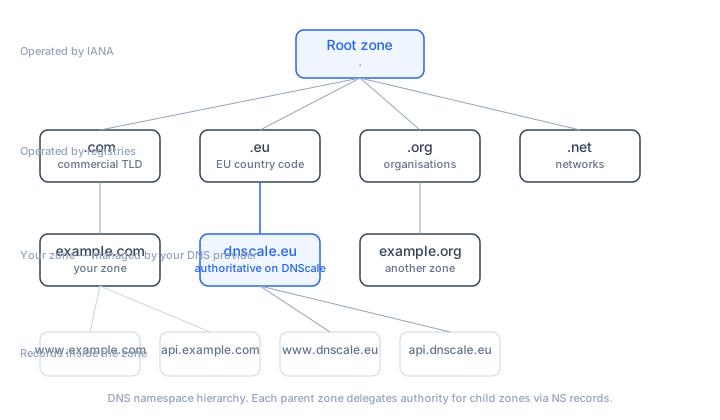
Before diving into each server type, here is the complete path a DNS query follows when the answer is not already cached:
User's Device (Stub Resolver)
    ↓
Recursive Resolver (e.g., 8.8.8.8)
    ↓
Root Name Server (e.g., a.root-servers.net)
    ↓
TLD Name Server (e.g., a.gtld-servers.net for .com)
    ↓
Authoritative Name Server (e.g., ns1.dnscale.eu)
    ↓
Answer returned to user
Each step narrows down the search. The root server points to the TLD server, the TLD server points to the authoritative server, and the authoritative server provides the final answer. You can observe this entire chain using dig +trace:
dig +trace www.example.com

; <<>> DiG <<>> +trace www.example.com
;; ...
.                   518400  IN  NS  a.root-servers.net.
;; Received from 192.168.1.1
com.                172800  IN  NS  a.gtld-servers.net.
;; Received from 198.41.0.4 (a.root-servers.net)
example.com.        172800  IN  NS  ns1.dnscale.eu.
;; Received from 192.5.6.30 (a.gtld-servers.net)
www.example.com.    3600    IN  A   192.0.2.1
;; Received from 185.x.x.x (ns1.dnscale.eu)
Stub Resolvers
A stub resolver is the DNS client built into your operating system. It is the starting point for every DNS query your device makes. When an application (like a web browser) needs to resolve a hostname, it calls the stub resolver, which forwards the query to a configured recursive resolver.
The stub resolver itself does not perform recursion — it relies entirely on the recursive resolver to do the work. You can see which recursive resolver your system uses:
# On macOS
scutil --dns | grep nameserver

# On Linux
cat /etc/resolv.conf
Stub resolvers maintain a small local cache. When this cache becomes stale or causes issues, you can flush it to force fresh lookups.
Recursive DNS Resolvers
A recursive DNS resolver is the workhorse of the DNS system. When your stub resolver sends a query, the recursive resolver is responsible for tracking down the correct IP address. If the resolver doesn't already have the answer cached, it will query other DNS servers on your behalf, following the delegation chain from root to TLD to authoritative server.
How Recursion Works
When a recursive resolver receives a query for www.example.com and does not have the answer cached:
- It queries a root server: "Where can I find information about
.com?" - The root server responds with the NS records for the
.comTLD - It queries the
.comTLD server: "Where can I findexample.com?" - The TLD server responds with the NS records for
example.com(e.g.,ns1.dnscale.eu) - It queries the authoritative server: "What is the A record for
www.example.com?" - The authoritative server responds with the IP address
- The recursive resolver caches the answer according to the TTL and returns it to the client
Popular Public Recursive Resolvers
Scroll horizontally to see all columns →
| Resolver | IPv4 | IPv6 | Operator |
|---|---|---|---|
| Google Public DNS | 8.8.8.8, 8.8.4.4 | 2001:4860:4860::8888 | |
| Cloudflare DNS | 1.1.1.1, 1.0.0.1 | 2606:4700:4700::1111 | Cloudflare |
| Quad9 | 9.9.9.9, 149.112.112.112 | 2620:fe::fe | Quad9 |
| OpenDNS | 208.67.222.222, 208.67.220.220 | 2620:119:35::35 | Cisco |
You can query any of these directly with dig:
# Query Google DNS
dig example.com @8.8.8.8

# Query Cloudflare DNS
dig example.com @1.1.1.1

# Query Quad9
dig example.com @9.9.9.9
Caching Behavior
Recursive resolvers cache every answer they receive, along with intermediate delegation information. The cache duration is controlled by the TTL set on each record. This caching is what makes DNS propagation take time — after you change a record, resolvers continue serving the cached version until the TTL expires.
For a beginner overview of each cache layer, including browser, operating system, forwarder, and resolver caches, see DNS Cache Explained.
# See the remaining TTL (it decreases with each query)
dig example.com @8.8.8.8
;; ANSWER SECTION:
example.com.    2847    IN    A    192.0.2.1
DNS Forwarders
A DNS forwarder is a server that receives DNS queries and forwards them to another recursive resolver rather than performing the full recursion itself. Forwarders are commonly used in enterprise networks:
- Corporate DNS servers that forward external queries to a public resolver while handling internal zones directly
- Home routers that forward all DNS queries to the ISP's resolver
- Caching forwarders that add a local caching layer in front of a remote recursive resolver
A forwarder reduces the load on the upstream resolver by caching responses locally, and it provides a single point of control for DNS policy (filtering, logging, etc.).
Root Name Servers
Root name servers are the backbone of the DNS hierarchy. They sit at the top of the delegation tree and are the first servers a recursive resolver contacts when it needs to resolve a domain name for the first time.
Root servers don't know the answer to every DNS query, but they can direct the resolver to the appropriate top-level domain (TLD) server. There are 13 root server identities (named a.root-servers.net through m.root-servers.net), but each identity is served by multiple physical servers distributed globally using anycast routing. In total, there are hundreds of root server instances worldwide.
# Query a root server directly
dig . NS @a.root-servers.net

# Ask a root server about .com
dig com NS @a.root-servers.net
;; AUTHORITY SECTION:
com.    172800    IN    NS    a.gtld-servers.net.
com.    172800    IN    NS    b.gtld-servers.net.
Root servers handle billions of queries per day and are critical infrastructure operated by organizations including ICANN, Verisign, NASA, the U.S. Army, and several universities and research institutions.
TLD Name Servers
Top-Level Domain (TLD) name servers manage the last part of a domain name, such as .com, .net, .org, or country codes like .eu, .de, .nl. When a recursive resolver is directed to a TLD server, it helps narrow down the search for the authoritative server that holds the actual DNS records for the requested domain.
There are two main categories of TLDs:
- Generic TLDs (gTLDs) —
.com,.net,.org,.info, and newer TLDs like.app,.dev,.cloud - Country Code TLDs (ccTLDs) —
.eu,.de,.nl,.uk,.fr, and others
# Query the .com TLD servers for a domain
dig NS example.com @a.gtld-servers.net
;; AUTHORITY SECTION:
example.com.    172800    IN    NS    ns1.dnscale.eu.
example.com.    172800    IN    NS    ns2.dnscale.eu.
The TLD server returns the NS records that point to your domain's authoritative nameservers. These NS records were set when you configured your domain registrar to delegate to DNScale (see DNS Delegation by Region).
Authoritative Name Servers
An authoritative DNS server contains the definitive DNS records for a domain. When a query reaches this server, it provides the final answer — such as the IP address for a website (via an A record or AAAA record), the mail server for a domain, or any other record in the zone.
Authoritative servers are the source of truth for DNS data. They do not perform recursion — they only answer queries for zones they are configured to serve.
Primary vs. Secondary Authoritative Servers
Authoritative servers can operate in two roles:
- Primary (master) — holds the original zone data, where changes are made
- Secondary (slave) — receives zone data from the primary through zone transfers (AXFR/IXFR) and serves read-only copies
DNScale uses database replication rather than traditional zone transfers, so all edge nodes serve the same authoritative data simultaneously. For multi-provider redundancy, see Multi-Provider DNS Deployment.
Querying Authoritative Servers Directly
You can bypass the recursive resolver and query an authoritative server directly:
# Query DNScale's authoritative server
dig example.com @ns1.dnscale.eu

# Get a specific record type
dig MX example.com @ns1.dnscale.eu

# Query for the SOA record
dig SOA example.com @ns1.dnscale.eu
Tip: When troubleshooting DNS issues, always query the authoritative server directly to confirm what the zone contains. If the authoritative server returns the correct answer but a public resolver does not, the issue is caching — wait for the TTL to expire or flush your local cache.
Comparing Server Types
Scroll horizontally to see all columns →
| Feature | Recursive Resolver | Root Server | TLD Server | Authoritative Server |
|---|---|---|---|---|
| Purpose | Resolve queries on behalf of clients | Direct to TLD servers | Direct to authoritative servers | Provide final answers |
| Caches data | Yes (based on TTL) | No | No | No (source of truth) |
| Performs recursion | Yes | No | No | No |
| Examples | 8.8.8.8, 1.1.1.1 | a.root-servers.net | a.gtld-servers.net | ns1.dnscale.eu |
| Query volume | Billions/day | Billions/day | Billions/day | Varies by domain |
DNS Security Across Server Types
Each server type faces different security threats:
- Recursive resolvers are targets for cache poisoning attacks, where an attacker tries to inject false records into the cache. DNSSEC validation at the resolver level prevents this
- Root and TLD servers are targets for DDoS attacks. Their anycast deployment and massive capacity help absorb such attacks
- Authoritative servers are targets for DDoS attacks aimed at making a domain unreachable. DNScale's anycast network distributes attack traffic across multiple edge nodes, and multi-provider DNS adds another layer of resilience
For domains using TLS certificates, the authoritative server also hosts CAA records that control certificate issuance, TLSA records for DANE, and email security records that depend on accurate DNS resolution.
How DNScale Supports All DNS Server Types
DNScale's authoritative DNS infrastructure is designed to fit cleanly into the standard resolver, root, TLD, and authoritative nameserver chain. As an authoritative DNS host:
- DNScale's edge nodes are deployed on an anycast network with points of presence across multiple regions
- Zone data is replicated across edge nodes so authoritative answers stay consistent without customer-managed zone transfers
- The platform supports all standard record types including A, AAAA, CNAME, MX, TXT, SRV, CAA, HTTPS, and more
- Records can be managed through the dashboard, API, Terraform, or DNSControl
Conclusion
Each type of DNS server plays a unique role in making the internet accessible. Stub resolvers initiate queries, recursive resolvers follow the delegation chain, root and TLD servers provide direction, and authoritative servers deliver the final answer. With DNScale, you benefit from a DNS platform built on reliable authoritative infrastructure, distributed across an anycast network, and designed to keep your domains reachable.
Frequently asked questions
- What's the difference between a recursive resolver and an authoritative nameserver?
- A recursive resolver does the work on behalf of a client — it walks the DNS tree (root → TLD → authoritative) and returns a final answer, caching as it goes. An authoritative nameserver holds the actual records for a specific zone and answers questions about that zone only. Recursive resolvers are queried by clients; authoritative servers are queried by recursive resolvers.
- What are the root DNS servers?
- Thirteen logical root server identities (A through M, each operated by a different organisation, replicated via anycast across hundreds of physical instances) sit at the top of the DNS hierarchy. They don't hold individual records — they tell resolvers which TLD nameservers to ask. Almost every cold-cache DNS query starts with a question to a root server.
- What is a TLD nameserver?
- A Top-Level Domain nameserver is responsible for one TLD —
.com,.eu,.org, etc. It doesn't hold individual zone records; it tells resolvers which authoritative nameservers handle a given second-level domain. So a query for example.com goes from root → .com TLD nameserver → example.com's authoritative nameservers. - Is a forwarder a recursive resolver?
- Not quite. A forwarder is a DNS server that, instead of walking the tree itself, forwards queries to another resolver (typically your ISP's or a public one like 1.1.1.1). It still caches answers and acts recursive-ish from the client's perspective, but the actual tree-walking happens upstream.
- Where does DNScale sit in this hierarchy?
- DNScale runs authoritative nameservers — the bottom of the resolution tree, where the records actually live. Public recursive resolvers (Google's 8.8.8.8, Cloudflare's 1.1.1.1, Quad9, ISP resolvers) query DNScale's authoritative servers when they need an answer for a zone you host on DNScale.
Inspect the DNS records for your domain
Check public DNS answers alongside the commands in this guide. Online checks do not measure your device’s local DNS path.
Open DNS lookup