
DNSSEC Key Management
Quick answer
DNSSEC signs your zone with two keys: the Key-Signing Key (KSK) signs the DNSKEY record set; the Zone-Signing Key (ZSK) signs everything else. The KSK's hash is published as a DS record at your registrar — that's the link in the chain of trust to the parent zone. Rollovers are the dangerous part: rotate the ZSK regularly using the pre-publish method, and rotate the KSK using the double-signature method, always honouring the ttl/ds-publication delays. A botched rollover bricks your domain for the duration of the longest cached signature.
On this page
What you'll learn
- Understand the role of KSK, ZSK, and CSK in DNSSEC signing and how DS records establish the chain of trust
- Follow a safe step-by-step key rollover procedure without causing DNS resolution failures
- Choose appropriate DNSSEC algorithms based on security and compatibility requirements
- Manage DNSSEC keys through the DNScale dashboard and API
DNSSEC (Domain Name System Security Extensions) protects DNS responses from tampering by adding cryptographic signatures to your zone data. Without DNSSEC, attackers can perform DNS cache poisoning to redirect users to malicious servers. Managing DNSSEC keys correctly is critical — a misstep during key changes can make your domain unresolvable.
Keys and DS Records
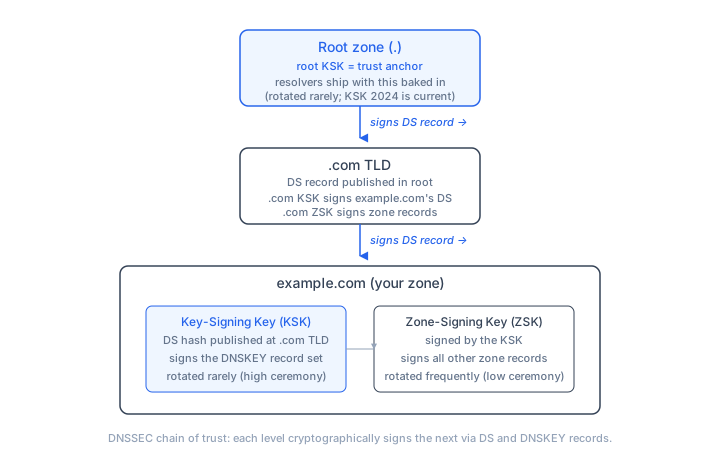
DNSSEC uses two types of cryptographic material:
- Signing keys live on your DNS server and sign zone data. DNScale uses CSK (Combined Signing Key) by default, which handles both zone signing and key signing in a single key pair.
- DS (Delegation Signer) records are published at your domain registrar. They tell resolvers which signing key to trust for your domain.
The DS record is derived from your signing key and contains four fields that your registrar requires:
| Field | Example | Description |
|---|---|---|
| Key Tag | 42665 | Numeric identifier linking the DS to a specific key |
| Algorithm | 13 | Signing algorithm (e.g., 13 = ECDSAP256SHA256) |
| Digest Type | 2 | Hash algorithm (e.g., 2 = SHA-256) |
| Digest | 8cbfa13b518e... | Hash of the public key |
The DS record creates a chain of trust that starts at the DNS root zone, passes through the TLD (like .com), and terminates at your DNS zone. Each link in the chain is verified cryptographically, ensuring that the DNS records a resolver receives are authentic.
KSK, ZSK, and CSK Explained
Traditional DNSSEC uses two separate key types:
Key Signing Key (KSK)
The KSK signs only the DNSKEY record set in your zone. It is the key whose hash appears in the DS record at your registrar. KSKs are typically larger (2048-bit RSA or equivalent) and rotated less frequently because every rollover requires updating the DS record at the parent zone.
Zone Signing Key (ZSK)
The ZSK signs all other records in the zone — A records, AAAA records, MX records, TXT records, and so on. ZSKs can be rotated more frequently because the rollover does not involve the parent zone or registrar. Only the DNSKEY record set needs to include both old and new ZSKs during the transition.
Combined Signing Key (CSK)
A CSK combines both roles into a single key pair. It signs everything — the DNSKEY record set and all other records. DNScale uses CSKs by default because they simplify management: you only have one key to track, and the rollover procedure is the same regardless of what the key signs.
Whether you use KSK/ZSK pairs or a CSK, the security properties are equivalent. The choice is primarily about operational complexity. CSKs are simpler but require registrar interaction on every rollover. KSK/ZSK pairs let you rotate ZSKs without touching the registrar.
Algorithm Choices
The signing algorithm determines the cryptographic strength and compatibility of your DNSSEC implementation. Here are the commonly used algorithms:
Scroll horizontally to see all columns →
| Algorithm | Number | Key Size | Status |
|---|---|---|---|
| RSA/SHA-256 | 8 | 2048-bit | Widely supported, larger signatures |
| RSA/SHA-512 | 10 | 2048-bit | Good security, larger responses |
| ECDSA P-256/SHA-256 | 13 | 256-bit | Recommended — small, fast, secure |
| ECDSA P-384/SHA-384 | 14 | 384-bit | Higher security, slightly larger |
| Ed25519 | 15 | 256-bit | Best performance, growing support |
| Ed448 | 16 | 456-bit | Highest security, limited support |
DNScale defaults to Algorithm 13 (ECDSAP256SHA256), which offers the best balance of security, performance, and compatibility. ECDSA keys produce much smaller signatures than RSA, which means smaller DNS responses and less risk of UDP fragmentation — particularly important for zones with many record types.
If your zone serves a large number of records or you are concerned about response size (for example, zones with multiple SRV records or CAA records), ECDSA algorithms are strongly preferred over RSA because they keep signed responses compact.
Key States
Each key in DNScale has two independent flags:
Active
An active key is currently signing zone data. DNS resolvers use the corresponding DS record at the registrar to validate these signatures.
An inactive key is not signing, but may still be published in the zone's DNSKEY record set. This is normal during key rollovers.
Published
A published key appears in the zone's DNSKEY record set, making it visible to resolvers. Keys can be published before they start signing — this is a deliberate step in the rollover process that allows resolvers to cache the new DNSKEY before it starts producing signatures.
Key Rollover
Key rollover is the process of replacing an active signing key with a new one. This must be done carefully because resolvers cache DS records and DNSKEY records with their TTL. Changing keys too quickly causes validation failures and makes your domain unreachable for DNSSEC-validating resolvers.
Why Keep Both DS Records
During a rollover, both the old and new DS records must exist at your registrar simultaneously. Resolvers that still have the old DNSKEY cached need the old DS to validate, while resolvers fetching fresh data need the new DS. Removing the old DS too early breaks resolution for cached resolvers.
This timing dependency is similar to how DNS propagation works generally — changes take time to reach all resolvers worldwide, and you must account for the worst case.
Step-by-Step Rollover
-
Generate a new key pair In the DNSSEC Key Management dialog, click Generate Key Pair. The new key is created as inactive and published — it appears in your zone's DNSKEY record set but does not sign any data yet.
-
Add the new DS record at your registrar Copy the DS record for the new key (shown under the "Inactive — not signing" group) and add it at your registrar alongside the existing DS record. Do not remove the old one yet.
-
Wait for propagation Wait at least 2x the parent zone's TTL (typically 24-48 hours for most TLDs). This ensures all resolvers worldwide have seen the new DS record. You can monitor propagation progress using tools described in DNS Propagation Explained.
-
Activate the new key In the DNSSEC dialog, click Activate on the new key. It will begin signing zone data. Optionally deactivate the old key.
-
Wait for old signatures to expire Wait at least the zone's signature validity period plus the DNSKEY TTL (typically 24 hours). This ensures no resolver still relies on the old key's signatures. Refer to TTL best practices for guidance on these timing windows.
-
Remove the old DS record At your registrar, remove the old DS record. Only the new key's DS should remain.
-
Delete the old key Back in DNScale, delete the old (now inactive) key pair.
Important: Never skip the waiting periods. Premature removal of DS records or keys is the most common cause of DNSSEC-related outages.
Rollover Schedule Recommendations
How often you rotate keys depends on your security requirements and operational capacity:
- CSK/KSK rollover: Every 1-2 years. Because this involves the registrar, less frequent is better.
- ZSK rollover (if using split keys): Every 1-3 months. These are self-contained within your zone, so more frequent rotation is practical.
- Emergency rollover: Immediately if you suspect key compromise. In an emergency, accept the risk of brief validation failures — a compromised key is worse.
DS Record Format for Registrars
When your registrar asks for DS record fields, copy them individually from the DNSSEC Key Management dialog:
Key Tag:     42665
Algorithm:   13
Digest Type: 2
Digest:      8cbfa13b518e46635bb83486120c824a04622d752dc5484c478be778496b1b77
Some registrars accept the full DS record as a single line:
42665 13 2 8cbfa13b518e46635bb83486120c824a04622d752dc5484c478be778496b1b77DNScale provides copy buttons for both formats.
Managing DNSSEC in DNScale
Using the Dashboard
- Navigate to your zone in the DNScale dashboard
- Click the Shield icon in the DNSSEC column to open Key Management
- Click Generate Key Pair to create signing keys
- Copy the DS records and add them at your registrar
- DNSSEC is active once the DS records propagate
Using the API
Enable DNSSEC for a zone:
curl -X PUT "https://api.dnscale.eu/v1/zones/{zone_id}/settings" \
  -H "Authorization: Bearer YOUR_API_KEY" \
  -H "Content-Type: application/json" \
  -d '{"dnssec_enabled": true}'
Generate a key pair:
curl -X POST "https://api.dnscale.eu/v1/zones/{zone_id}/cryptokeys" \
  -H "Authorization: Bearer YOUR_API_KEY" \
  -H "Content-Type: application/json" \
  -d '{"keytype": "csk", "algorithm": "ECDSAP256SHA256", "active": true}'
Get DS records:
curl "https://api.dnscale.eu/v1/zones/{zone_id}/ds-records" \
  -H "Authorization: Bearer YOUR_API_KEY"
List cryptokeys (includes active/inactive status):
curl "https://api.dnscale.eu/v1/zones/{zone_id}/cryptokeys" \
  -H "Authorization: Bearer YOUR_API_KEY"
You can also manage DNSSEC keys as code using the Terraform provider or DNSControl. For multi-provider setups, be aware that multi-provider DNSSEC has additional complexity.
DNSSEC and Related Security Records
DNSSEC works alongside several other DNS-based security mechanisms:
- TLSA records — DANE (DNS-Based Authentication of Named Entities) uses DNSSEC-signed TLSA records to pin SSL/TLS certificates in DNS. TLSA only works when DNSSEC is enabled.
- SSHFP records — SSH host key fingerprints published in DNS. Like TLSA, they depend on DNSSEC for trust.
- CAA records — While CAA does not require DNSSEC, signing your zone prevents attackers from spoofing CAA responses to bypass certificate issuance controls.
- SPF, DKIM, and DMARC — Email authentication records benefit from DNSSEC because it prevents spoofed DNS responses that could bypass email security checks.
Common Mistakes
- Removing the old DS before the new key is active — resolvers cannot validate signatures from either key, causing SERVFAIL responses
- Not waiting for TTL expiry — cached records at resolvers still reference the old configuration
- Deleting keys before removing the DS — the registrar still points to a key that no longer exists, breaking the chain of trust
- Using SHA-1 digest type — SHA-1 (Digest Type 1) is deprecated; always prefer SHA-256 (Digest Type 2) or SHA-384 (Digest Type 4)
- Using RSA keys that are too small — 1024-bit RSA keys are considered insecure; use 2048-bit RSA or, better yet, ECDSA (Algorithm 13)
Related
- What is DNS? — DNS fundamentals
- What Is a DNS Zone — DNS zone basics
- DNS Propagation Explained — How DNS changes propagate globally
- What Is a TLSA Record — DANE/TLSA for certificate pinning via DNS
- DNS Attacks and Threats — Cache poisoning and other threats DNSSEC prevents
- DNS Record Types — Overview of all record types including DNSKEY and DS
- What is an NS Record? — Nameserver delegation and the chain of trust
Frequently asked questions
- What's the difference between a KSK and a ZSK?
- The Key-Signing Key (KSK) only signs the DNSKEY record set in your zone. The Zone-Signing Key (ZSK) signs all the other record sets (A, AAAA, MX, etc.). This split lets you rotate the ZSK frequently with low ceremony, while the KSK — which the parent zone trusts via your DS record — rotates rarely with high ceremony.
- What is a CSK?
- A Combined Signing Key (CSK) is a single key that does both jobs: it signs DNSKEY records (KSK role) and other records (ZSK role). It's simpler operationally but means every rotation is a high-ceremony event involving the registrar. Many modern deployments are moving to CSK with ECDSA P-256 because the operational simplicity outweighs the rotation cost.
- Which DNSSEC algorithm should I use?
- ECDSA P-256 (algorithm 13) is the modern default — small signatures, broad resolver support, fast verification. RSA SHA-256 (algorithm 8) is still widely used and well-supported but produces larger signatures. ED25519 (algorithm 15) is excellent cryptographically but had patchy resolver support historically; check coverage in your target population. Avoid SHA-1-based algorithms for new zones.
- How do I do a safe ZSK rollover?
- Use the pre-publish method: (1) generate a new ZSK and publish it in the DNSKEY set alongside the old one; (2) wait for the DNSKEY TTL so all resolvers have both keys cached; (3) start signing new records with the new ZSK; (4) wait for the longest record TTL in the zone so all old signatures expire; (5) remove the old ZSK from the DNSKEY set.
- What happens if I rotate the KSK without updating the DS record at the registrar?
- Validation breaks. Resolvers fetch the new DNSKEY signed by the new KSK, but the parent zone's DS record still hashes the old KSK — so the chain of trust is broken and validating resolvers refuse to resolve your domain. Always coordinate KSK rollovers with the DS update at the registrar, using the double-signature or double-DS method.
Check your domain’s DNSSEC configuration
Inspect delegation and signing before changing keys or disabling validation.
Check DNSSEC