DNS Migration Guide — Move Providers Without Breaking Production
Step-by-step guide to migrating DNS hosting from one provider to another with minimal disruption risk. TTL preparation, zone import, parallel running, NS swap, verification, rollback.
Answer snapshot
A safe DNS migration is a five-phase process: (1) lower TTLs 48 hours ahead so caches refresh quickly during cutover, (2) export zone data and import to the new provider, (3) run both providers in parallel with matching zone data for an overlap window, (4) update the registrar's NS to the new provider only, (5) wait for the TLD-level TTL to expire before fully decommissioning the old provider. Done correctly, resolvers should keep finding an answer because both providers serve the same data while caches transition. Most outages happen when teams skip phase 1 (didn't lower TTLs), miss DNSSEC/delegation details, or decommission the old provider too early.
What you'll learn
- Plan a TTL-aware DNS migration with a documented timeline that resolvers will respect
- Export and validate zone data between providers without losing records or DNSSEC state
- Run two DNS providers in parallel during the cutover window with matching authoritative data
- Verify the migration end-to-end and identify when it's safe to decommission the old provider
- Recover safely if the migration goes wrong mid-cutover
A DNS migration is one of the highest-stakes routine operations in modern infrastructure. Done correctly, resolvers should keep finding an answer because both providers serve the same data while caches transition. Done incorrectly, you can create hours of intermittent SERVFAIL or NXDOMAIN that your monitoring may struggle to catch and your customers will catch.
The good news: the safe path is well-known and the failure modes are well-understood. This guide is the operational checklist.
Why DNS Migrations Are Hard
DNS has caches at every layer:
- Browser DNS cache (often 60 seconds to several minutes)
- OS DNS cache (e.g., macOS
mDNSResponder, Windows DNS Client) - Recursive resolver cache (governed by your zone's TTLs)
- TLD nameserver cache (governed by the TLD-level NS TTL, which you don't control)
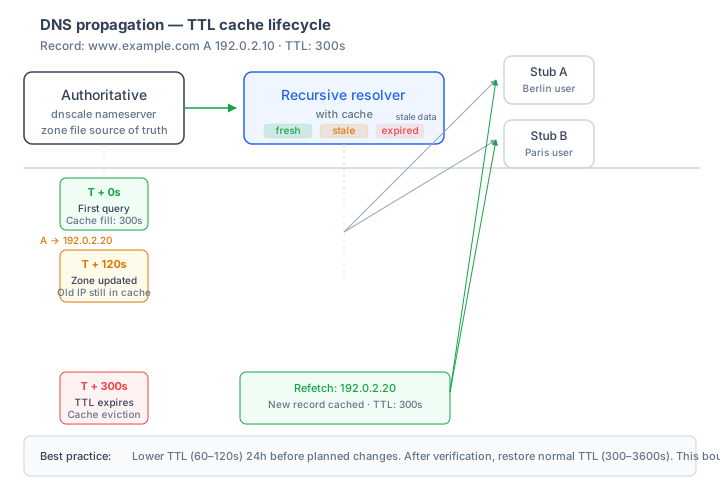
When you change something, every layer has to either refresh its cache or get evicted. The TTL controls when that happens — but only for the next lookup after the change. Anyone who has cached the old answer at TTL=86400 will keep using it for up to 24 hours.
The right-shaped migration plan acknowledges this and overlaps providers during the transition.
The Five Phases
T-7 days     T-2 days     T-0           T+24h          T+7 days
   │            │            │             │              │
   ▼            ▼            ▼             ▼              ▼
Phase 1   Phase 2     Phase 3       Phase 4       Phase 5
Plan +    Lower       Import +      NS swap       Decommission
verify    TTLs        parallel run  at registrar  old provider
Phase 1 — Plan and Verify (T-7 days)
Before changing anything, build the inventory:
# Get every record at the old provider
dig AXFR yourdomain @old-ns1.example.com
# Or via the provider's API / dashboard export
Check for:
- All record types — A, AAAA, MX, TXT, CNAME, NS, SOA, SRV, CAA, TLSA, etc. Don't miss the long tail.
- Subdomain delegations — any sub-zones that have their own NS records pointing elsewhere.
- DNSSEC state — is the old zone signed? What algorithm? What KSK / ZSK / DS configuration?
- Wildcard records — confirm any
*.yourdomainentries are captured. - Apex CNAME / ALIAS / ANAME — provider-specific records that may not have a 1:1 equivalent.
- Provider-specific record types or features — traffic steering, GSLB, IP filter rules, etc.
Document the current TTL on every record. You'll need it to plan phase 2.
Choose your migration method:
- IaC sync (preferred): define the zone in Terraform or DNSControl, configure both old and new providers, push identical records to both. Versionable, reviewable, drift-detectable.
- AXFR/IXFR: configure the new provider as a secondary of the old (or vice versa), with TSIG authentication. Works only if both providers support it.
- Manual import: export from old, import to new via dashboard or API. Simplest for one-off migrations; risk of human error.
Phase 2 — Lower TTLs (T-2 days)
This is the step most teams skip and it's the one that determines whether the migration is smooth or jagged.
In the old zone, lower the TTL on every record to 300 seconds (5 minutes). Wait at least the previous TTL duration before proceeding. If the previous TTL was 3600 (1 hour), wait at least 1 hour. If it was 86400, wait at least 24 hours.
Why this matters: resolvers that cache the OLD record set with TTL=86400 will keep using it for 24 hours. Once they refresh, they'll cache the new record (with TTL=300) and refresh quickly when you change it again at cutover. Skipping this means your 5-minute cutover window is actually a 24-hour window for some resolvers.
# Verify TTLs are now low at the authoritative server
dig +short A yourdomain @old-ns1.example.com | head
dig A yourdomain @old-ns1.example.com | grep "yourdomain"
# Should show TTL near 300, not the old 3600 or 86400
Then verify a public resolver has picked it up (this confirms the lower TTL is reaching the cache layer):
dig A yourdomain @1.1.1.1
# Wait, retry — the TTL should be counting down from 300, not from a higher number
Wait at least 24 hours after lowering TTLs before proceeding to phase 3. Wait longer if your previous TTL was longer than 24 hours.
Phase 3 — Import and Parallel Run (T-1 day to T-0)
Push the zone to the new provider. Verify every record is present and correct:
# Compare every record type between providers
dig A yourdomain @old-ns1.example.com
dig A yourdomain @ns1.dnscale.eu
# (continue for AAAA, MX, TXT, NS, etc.)
For thoroughness, AXFR both and diff the zone files:
dig AXFR yourdomain @old-ns1.example.com > old.zone
dig AXFR yourdomain @ns1.dnscale.eu > new.zone
diff <(sort old.zone) <(sort new.zone)
If you're using IaC sync, your tool (Terraform plan, dnscontrol preview) should already show no differences.
Now publish NS records pointing at BOTH providers. This is the crucial overlap step. In your zone, the NS record set should now include nameservers from both:
yourdomain.   3600   IN   NS   ns1.old-provider.com.
yourdomain.   3600   IN   NS   ns2.old-provider.com.
yourdomain.   3600   IN   NS   ns1.dnscale.eu.
yourdomain.   3600   IN   NS   ns2.dnscale.eu.
This NS record set must exist at both providers. Resolvers will pick whichever NS responds fastest, and as long as both providers serve identical data, the answer is consistent regardless of which one they hit.
Verify by querying multiple resolvers:
dig +short NS yourdomain @1.1.1.1
dig +short NS yourdomain @8.8.8.8
dig +short NS yourdomain @9.9.9.9
You should see all four nameservers from all three resolvers (with possible randomisation in order).
Phase 4 — NS Swap at the Registrar (T-0)
This is the cutover. At your registrar (not in your zone), update the NS records to point only to the new provider:
yourdomain.   IN   NS   ns1.dnscale.eu.
yourdomain.   IN   NS   ns2.dnscale.eu.
The old provider's nameservers are now removed from the TLD-level NS set. The old provider may still serve queries for resolvers that have cached the old TLD-level NS, but new lookups will be directed to the new provider.
Verify the change at the TLD:
dig +short NS yourdomain @a.gtld-servers.net.   # for .com
# Should show only DNScale nameservers
Then verify resolver caches are picking it up over time:
dig +short NS yourdomain @1.1.1.1
dig +short NS yourdomain @8.8.8.8
# Both should converge on DNScale nameservers as their TLD-level cache expires
Phase 5 — Decommission (T+1 day to T+7 days)
Wait for the TLD-level NS TTL to fully expire. This is often 1–2 days for ccTLDs. During this window, resolvers that cached the old TLD-level NS will continue querying the old provider. Both providers should serve identical data so this doesn't matter — but it does mean you can't decommission the old provider yet.
Track the cutover via the old provider's analytics or query logs. When query traffic drops to zero (or near-zero) and stays there for 24 hours, you're safe to decommission.
Sequenced decommission:
- Remove the new-provider NS records from the old provider's zone (so the old provider only references its own nameservers, not DNScale's). This shrinks the old provider's published NS set, but resolvers that find it will still resolve correctly.
- Wait another 24 hours to let any straggler resolver caches drain.
- Disable the zone at the old provider — either delete it, or freeze it. Confirm via analytics that no further query traffic is hitting it.
- Cancel the old provider's subscription if applicable.
If you're keeping the old provider as a multi-provider secondary (recommended for production), don't decommission — instead, transition the old provider to an explicit secondary configuration.
Migration with DNSSEC
If your zone is DNSSEC-signed, the migration has additional steps because the DS record at the registrar is a separate operation from the NS record.
Option A — Disable DNSSEC, migrate, re-enable
Simpler but interrupts DNSSEC continuity:
- Remove the DS record at the registrar (DNSSEC validation now disabled at the parent).
- Wait for TLD-level DS TTL to expire — typically 24–48 hours.
- Disable DNSSEC signing at the old provider.
- Migrate as in phases 3–5 above.
- Enable DNSSEC at the new provider, generate the new DS, publish at the registrar.
During the gap (between step 1 and step 5), your zone is unsigned. For most domains this is acceptable for a few days; for domains under regulatory DNSSEC requirements, it isn't.
Option B — Multi-signer DNSSEC (RFC 8901)
Preserves DNSSEC continuously across the migration, but requires both providers to support multi-signer:
- Configure both providers in multi-signer mode, exchanging DNSKEY sets so each provider signs answers but both DNSKEYs appear in the published DNSKEY RRset.
- Update DS records at the registrar to include keys from both providers during the overlap.
- Migrate as in phases 3–5 above.
- Remove the old provider's DNSKEY from the published set after cutover.
- Update DS at registrar to remove the old key.
This is operationally complex. Treat multi-signer DNSSEC as a provider-coordinated project: both providers must confirm the exact RFC 8901 model, DNSKEY exchange, and DS rollover plan before cutover. See DNSSEC key management.
Rolling Back Mid-Migration
The migration is rollback-safe up until phase 5. Specifically:
- During phase 3 (parallel run): rollback = remove the new provider's NS from your zone and revert. Both providers were serving identical data, so no resolver was harmed.
- During phase 4 (just after NS swap at registrar): rollback = revert the registrar's NS to the old provider. Resolvers that have already cached the new NS will refresh within their TTL.
- During phase 5 before decommission: rollback = revert registrar NS to old provider. Both providers still serve.
- After phase 5 decommission: rollback is not possible without re-importing the zone to the old provider. This is why decommissioning shouldn't start until you've verified the new provider for 24+ hours.
If something is broken mid-migration, don't decommission. Diagnose first.
Verification Checklist
Run all of these at T-0 and again at T+1, T+2, T+7:
# 1. NS records at the TLD
dig +short NS yourdomain @a.gtld-servers.net.

# 2. NS records cached at major resolvers
dig +short NS yourdomain @1.1.1.1
dig +short NS yourdomain @8.8.8.8
dig +short NS yourdomain @9.9.9.9

# 3. A record from new authoritative
dig +short A yourdomain @ns1.dnscale.eu

# 4. A record cached at major resolvers
dig +short A yourdomain @1.1.1.1
dig +short A yourdomain @8.8.8.8

# 5. Full chain trace
dig +trace yourdomain | tail -20

# 6. DNSSEC validation (if applicable)
dig +dnssec yourdomain @1.1.1.1
# Look for the AD flag in the response header

# 7. MX records (don't forget email)
dig +short MX yourdomain @1.1.1.1

# 8. All other record types relevant to your stack
# AAAA, TXT (SPF, DKIM, DMARC), CAA, SRV, etc.
Common Failure Modes
Skipped TTL lowering
Symptom: the cutover window is hours longer than expected; some users see the old answers for many hours.
Recovery: wait. Once the old TTL fully ages out, the new answers take over.
Decommissioned old provider too early
Symptom: SERVFAIL or timeouts for users whose resolvers still have the old NS cached.
Recovery: re-enable the old provider's zone if possible. If decommissioning is final, wait for the TLD-level NS TTL to fully expire in all caches.
Zone data drift between providers during parallel run
Symptom: different resolvers return different answers depending on which NS they queried.
Recovery: pick one provider as the source of truth, force-sync the other. If using IaC, run terraform apply or dnscontrol push and let the tool reconcile.
DNSSEC validation failures after migration
Symptom: validating resolvers (1.1.1.1, 9.9.9.9) return SERVFAIL; non-validating resolvers work.
Recovery: see how DNSSEC works. Most likely a DS record at the registrar that doesn't match the new zone's DNSKEY.
NS records inside the zone don't match registrar NS
Symptom: dig NS yourdomain @authoritative returns one set; dig NS yourdomain @a.gtld-servers.net. returns another. Resolvers may pick whichever they cached, leading to inconsistent behaviour.
Recovery: align the two. The NS records inside your zone should match the NS records published at the registrar (TLD level). Most modern providers do this automatically, but it's worth verifying.
Related Reading
- DNS change review checklist -- pre-change review, verification, and rollback template
- DNS TTL best practices — TTL planning
- DNS propagation explained — what's actually happening at each layer
- Zone import methods — getting data into the new provider
- DNS troubleshooting — what to do when verification fails
- Multi-provider DNS deployment — keeping the old provider as a long-term secondary
- What is secondary DNS — AXFR-based migration option
- DNSSEC key management — including multi-signer migration
- DNSControl guide — IaC-based zone definition
- Terraform provider guide — IaC-based zone definition
References
- IETF RFC 1035 — Domain Names — Implementation and Specification
- IETF RFC 1995 — Incremental Zone Transfer in DNS (IXFR)
- IETF RFC 1996 — A Mechanism for Prompt Notification of Zone Changes (NOTIFY)
- IETF RFC 5936 — DNS Zone Transfer Protocol (AXFR)
- IETF RFC 8901 — Multi-Signer DNSSEC Models
- IETF RFC 8945 — Secret Key Transaction Authentication for DNS (TSIG)
Frequently asked questions
- How long should a DNS migration take?
- From 'plan' to 'old provider fully decommissioned': budget 7–10 days minimum. The longest TTL on your old zone (often 86400 / 24 hours) plus the TLD-level NS TTL (often 1–2 days for ccTLDs) plus a safety margin. Compressing this is risky — caches don't honour your urgency.
- Do I need to lower TTLs before migrating?
- Yes — and this is the single most-skipped step. Lower the TTLs on every record in your old zone to 300 seconds (5 minutes) at least 48 hours before cutover. This gives resolver caches time to learn the short TTL, so when you finally swap, they refresh within minutes instead of hours. Skipping this turns a 5-minute window of inconsistency into a 24-hour one.
- Should I use AXFR or IaC sync to copy the zone?
- For migrations between modern providers with public APIs, IaC sync (Terraform or DNSControl pushing identical records to both providers) is cleaner — versionable, reviewable, drift-detectable. AXFR works between providers that both support it (with TSIG keys), but firewall holes and quirks make it more fragile. If both options are available, prefer IaC sync.
- What about DNSSEC during the migration?
- If your old zone has DNSSEC enabled, you have two choices: (a) disable DNSSEC on the old zone before migrating (remove DS at registrar, wait for TLD propagation, then disable signing on old provider — 48 hours minimum) and re-enable on the new provider after migration; (b) run multi-signer DNSSEC (RFC 8901) only when both providers have explicitly confirmed support and the DNSKEY/DS rollover plan has been tested. Option (a) is simpler; option (b) preserves DNSSEC continuously but requires provider coordination.
- When can I decommission the old provider?
- Only after both: (1) the TLD-level NS TTL has fully expired (so all resolvers see only the new NS), and (2) you've verified through analytics or query logs that the old provider is receiving zero query traffic for at least 24 hours. Decommissioning while the TLD still serves the old NS to some resolvers will cause SERVFAIL for those resolvers until their cache expires.
- What if something goes wrong mid-migration?
- If you're still in the parallel window (both providers serving identical data), rolling back is just reverting the registrar's NS records to the old provider only. If you've already decommissioned the old provider's data and resolvers are returning bad answers from the new provider, the recovery is to fix the new provider's data in place — at this point rolling back to a decommissioned provider isn't possible. This is why phase 5 (decommissioning) should not start until the new provider has been verified for 24+ hours.
Related guides
Operations
DNS Operations
A practical operating model for DNS changes, migrations, monitoring, troubleshooting, incident response, and rollback.
Operations
DNS Change Review Checklist: Ship DNS Changes Without Outages
A practical DNS change review checklist for production records, TTL preparation, authoritative and recursive verification, rollback, monitoring, and PR reviews.
Operations
Primary DNS vs Secondary DNS — Redundancy and Zone Transfers
Understand the difference between primary and secondary DNS servers, how zone transfers (AXFR/IXFR) keep them in sync, and how to build a redundant DNS infrastructure.
Operations
DNSSEC Failure Troubleshooting
Diagnose DNSSEC SERVFAIL outages caused by DS mismatches, expired signatures, unsigned answers, missing DNSKEY records, and unsafe DNSSEC disable steps.
Ready to manage your DNS with confidence?
DNScale provides anycast DNS hosting with a global network, real-time analytics, and an easy-to-use API.
Start free