DNS Troubleshooting — A Symptom-First Guide
A symptom-first guide to diagnosing DNS issues — site won't load, email bouncing, NXDOMAIN, SERVFAIL, intermittent failures — with the dig and nslookup commands that prove what's broken.
Answer snapshot
When DNS is broken, start by isolating the layer: client cache, recursive resolver, authoritative server, or registrar/delegation. dig +trace yourdomain shows the full chain; comparing answers from multiple resolvers (1.1.1.1, 8.8.8.8, 9.9.9.9) and querying your authoritative server directly (dig @ns1.dnscale.eu) tells you whether the problem is propagation, caching, or your authoritative data. This guide walks through the most common symptoms and the exact commands that prove the diagnosis.
What you'll learn
- Map common DNS symptoms (site won't load, email bouncing, intermittent failures) to specific failure layers
- Use dig and nslookup to isolate problems to client cache, resolver, authoritative server, or delegation
- Recognise NXDOMAIN, SERVFAIL, REFUSED, and timeout responses and what each tells you
- Walk a propagation issue through to confirmed resolution without guessing
When DNS is broken, the worst thing you can do is guess. Every layer between the user and your authoritative server has its own cache, its own potential for misconfiguration, and its own diagnostic tooling. If you need the broad caching concept first, start with What Is Cache. This guide is a symptom-first tree: pick the symptom you're seeing, follow the dig commands, and isolate the failure to a specific layer before you start changing things.
For depth on individual sub-topics, this page links into the dedicated guides on dig, nslookup, NXDOMAIN, SERVFAIL, propagation, and flushing DNS caches.
If you are troubleshooting immediately after a planned edit, compare the change ticket against the DNS change review checklist before making another DNS change.
The Layers Where DNS Can Fail
Before any diagnostic, hold this mental model:
[ Browser / OS DNS cache ]
            ▼
[ Recursive resolver ] (ISP, 1.1.1.1, 8.8.8.8, corporate)
            ▼
[ TLD nameservers ] (.com, .eu, .de)
            ▼
[ Authoritative nameservers ] (DNScale, your provider)
            ▼
[ Zone data ] (the records themselves)
Every layer can be the cause. The diagnostic strategy is to bypass each layer and see where the answer changes:
- Browser / OS cache — bypass with a fresh terminal session or
dig(which doesn't use the browser cache). - Recursive resolver cache — bypass by querying a different resolver (
dig @1.1.1.1vs@8.8.8.8vs@9.9.9.9). - TLD nameservers — bypass by querying them directly (
dig NS yourdomain @a.gtld-servers.net.for.com, or use+trace). - Authoritative nameservers — bypass by querying directly (
dig @ns1.dnscale.eu yourdomain). - Zone data — verify by checking the dashboard or API for the record you expect.
The Universal First Step: dig +trace
dig +trace yourdomain walks the full chain and prints what every level returns. Run it before anything else:
dig +trace example.comWhat to look for in the output:
- Root servers return the TLD nameservers for
.com(or whichever TLD). - TLD servers return the NS records for your domain — these should be your provider's nameservers (e.g.,
ns1.dnscale.eu,ns2.dnscale.eu). - Your provider's nameservers return the answer.
- If any step returns nothing, times out, or returns unexpected data — that's where the failure is.
If +trace works but normal queries don't, the issue is recursive-resolver-side. If +trace itself fails at a specific level, you've isolated the problem to that level.
Symptom: "My website won't load"
Step 1 — Confirm DNS is the problem
dig A yourdomain @1.1.1.1- Returns the correct IP → DNS is fine; the problem is connectivity, TLS, or HTTP at the destination. Try
curl -v https://yourdomainor a port test. - Returns the wrong IP → DNS is the problem. Continue to Step 2.
- Returns NXDOMAIN → see NXDOMAIN explained.
- Returns SERVFAIL → see SERVFAIL explained.
- Times out → either the resolver is broken or your network can't reach it. Try
dig @8.8.8.8anddig @9.9.9.9for comparison.
Step 2 — Compare resolvers
dig +short A yourdomain @1.1.1.1
dig +short A yourdomain @8.8.8.8
dig +short A yourdomain @9.9.9.9- All three return the same correct IP → the issue is local: client cache, browser, VPN, or hosts file. Flush DNS (how to flush DNS cache) and retest.
- Different resolvers return different IPs → propagation in progress, or one resolver is caching stale data. Wait or contact the resolver operator.
- All three return wrong IPs → the wrong data is at your authoritative server. Continue to Step 3.
Step 3 — Query your authoritative server directly
dig +short A yourdomain @ns1.dnscale.eu- Returns the correct IP → resolvers are stuck on stale data; wait for TTL or contact resolver operator.
- Returns the wrong IP → your zone data is wrong. Fix it in the dashboard / API. The fix will propagate within the TTL.
- Times out → your authoritative server is unreachable. Check the provider's status page.
Symptom: "Some users can reach the site, others can't"
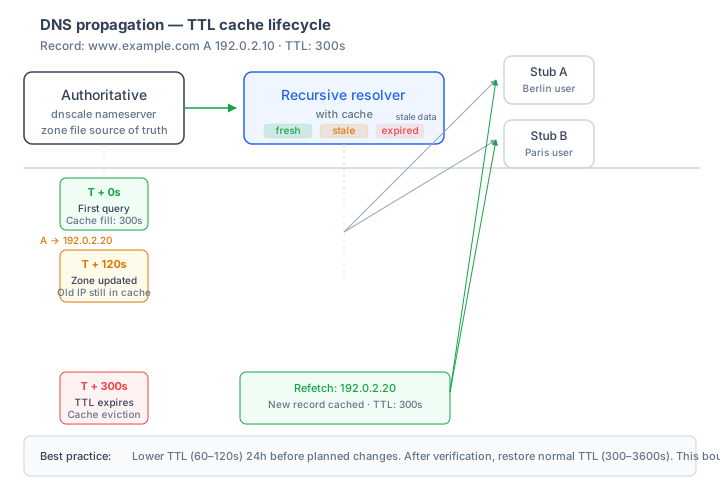
This is almost always a propagation or caching issue. The short version: one resolver may still have the old answer in cache while another has already refreshed.
dig +short A yourdomain @1.1.1.1
dig +short A yourdomain @8.8.8.8
dig +short A yourdomain @9.9.9.9
If different resolvers return different answers, you're mid-propagation. The "wrong" answer will age out within the old TTL.
If you recently lowered TTLs but still see this, remember: lowering the TTL only takes effect after the previous TTL has expired in caches. If the old record had TTL 86400, you have to wait that long before the new low-TTL records start circulating.
See DNS propagation explained for the full mental model.
Symptom: "Email is bouncing"
DNS is responsible for routing email to your mail server (MX), authenticating the sending IP (SPF), verifying message integrity (DKIM), and policy (DMARC). Each is a separate record.
dig MX yourdomain
dig TXT yourdomain                              # SPF lives in a TXT record
dig TXT _dmarc.yourdomain                       # DMARC policy
dig TXT default._domainkey.yourdomain           # DKIM (selector-specific)
The bounce message itself usually says which check failed:
- "550 5.7.26 This message does not pass authentication checks (SPF and DKIM both don't pass)" → SPF or DKIM is wrong.
- "554 5.7.1 Sender domain rejected: not in our list of trusted domains" → MX or domain reputation problem.
- "DMARC policy reject" → SPF/DKIM aren't aligned with the From: domain; check DMARC policy and alignment.
See email security: SPF, DKIM, DMARC for a full diagnostic walk-through.
Symptom: "DNSSEC validation is failing"
Symptom: validating resolvers (1.1.1.1, 9.9.9.9) return SERVFAIL; non-validating resolvers work fine.
dig +dnssec +cd yourdomain @1.1.1.1   # +cd disables DNSSEC validation
dig +dnssec yourdomain @1.1.1.1       # default validation
If +cd returns the answer but the default returns SERVFAIL, you have a DNSSEC chain problem. Use DNSViz to visualise the chain. Most likely causes:
- Stale DS at registrar — the parent zone's DS doesn't match your zone's KSK.
- Expired RRSIG — your authoritative server stopped re-signing.
- Algorithm mismatch — DS hashes a key with one algorithm, DNSKEY publishes a different one.
See how DNSSEC works and DNSSEC key management for the recovery procedures.
Symptom: "I just changed my NS records and now nothing resolves"
NS changes at the registrar are the most fragile DNS operation, because both the parent zone (TLD) and resolver caches need to update. The expected timeline:
- Registrar updates the registry: minutes to hours.
- Registry pushes to TLD nameservers: usually fast, but TLD-level DNSSEC may add latency.
- Recursive resolvers refresh their cached NS for your domain: bounded by the TLD-level NS TTL (often 1–2 days for ccTLDs).
Diagnostic:
dig NS yourdomain @a.gtld-servers.net.   # ask the TLD directly (.com)
dig NS yourdomain @8.8.8.8                # ask Google's resolver
dig NS yourdomain @1.1.1.1                # ask Cloudflare's resolver
If the TLD has the new NS but resolvers still show the old ones, you're waiting for resolver cache TTL. If the TLD also shows the old NS, the registry hasn't updated — check the registrar's UI for a publication status.
The right pre-cutover step is to lower the NS TTL inside your zone 48 hours before the change, but most of the parent-side caching is governed by the TLD-level NS TTL, which you don't control. Plan migrations with a 24–48 hour overlap window where both old and new providers serve the zone.
Symptom: "Intermittent failures — works sometimes, fails sometimes"
The single most common cause: a multi-A record set where one of the IPs is unhealthy. DNS round-robins through them, so users hit the bad one randomly.
dig +short A yourdomainIf you see multiple IPs and one of them is dead, remove it from the zone or rely on a load balancer with health checking ahead of DNS-level round-robin.
Other intermittent causes:
- Authoritative server in one region failing while others work — your provider's status page should show this.
- DNSSEC validation failing only at validating resolvers — see DNSSEC section above.
- Browser DNS cache extending beyond TTL — unique to specific browser/OS combinations; flush and retest.
Symptom: "I can resolve from outside, but not from inside my company network"
Almost always corporate DNS / split-horizon DNS:
- Corporate DNS may have its own copy of your zone (split-horizon) returning internal IPs.
- Firewall may block DNS over UDP/53 or TCP/53 to external resolvers, forcing all queries through corporate DNS.
- VPN or DNS filtering may be intercepting and rewriting answers.
Diagnostic:
dig +short A yourdomain @8.8.8.8       # external public resolver
dig +short A yourdomain @<corp-resolver-IP>   # corporate resolver
If they return different answers, your corporate DNS has its own (possibly stale) copy. Talk to your IT/networking team.
The Decision Tree
Site won't load
    ├── dig @public-resolver returns correct IP → not DNS, check connectivity / TLS / HTTP
    ├── dig @public-resolver returns wrong/no IP
    │       ├── dig @authoritative-server returns correct IP → resolver caching, wait or contact
    │       ├── dig @authoritative-server returns wrong IP → fix zone data
    │       └── dig @authoritative-server times out → provider problem, check status
    └── dig @public-resolver times out → connectivity to resolver

Email bouncing
    ├── dig MX yourdomain returns nothing → add/fix MX
    ├── dig TXT yourdomain has no v=spf1 → add/fix SPF
    ├── dig TXT _dmarc.yourdomain has no v=DMARC1 → add DMARC policy
    └── DKIM signature failing → check DKIM TXT record at the selector

NXDOMAIN
    └── See /learning/nxdomain-explained

SERVFAIL
    ├── +cd works, default fails → DNSSEC issue (see /learning/how-dnssec-works)
    └── Both fail → authoritative or chain problem (use +trace)

Just changed NS records
    └── Compare answers from TLD direct vs public resolvers; wait for TLD-level TTL

Intermittent failures
    ├── Multi-A with unhealthy member → remove or load-balance
    └── Regional authoritative issue → check provider status page

Internal vs external mismatch
    └── Corporate split-horizon DNS or firewall — check with networking team
DNScale feature
Catch NXDOMAIN and SERVFAIL spikes sooner
Alert routes can watch zone-level NXDOMAIN, SERVFAIL, query-drop, and QPS thresholds so broken deploys and resolver-visible failures do not wait for a dashboard check.
Available on Scale and custom plansTools Beyond dig
nslookup— Windows-friendly equivalent to dig. See nslookup tutorial.drill— modern dig replacement, included with NLnet Labs tools.kdig— Knot DNS's dig variant, with native DNSSEC validation output.- DNSViz — visualise DNSSEC chains and spot breakages.
- Verisign DNSSEC Debugger — alternative chain visualiser.
dnsperf/resperf— benchmark resolver and authoritative performance.
Related Reading
-
digcommand tutorial — 30 worked examples -
nslookuptutorial - NXDOMAIN errors — causes and fixes
- SERVFAIL errors — causes and fixes
- DNS propagation explained
- DNS change review checklist
- How to flush DNS cache
-
Fix
DNS_PROBE_FINISHED_NO_INTERNET - DNS migration zero-downtime guide
- Email security: SPF, DKIM, DMARC
References
- IETF RFC 1034 — Domain Names — Concepts and Facilities
- IETF RFC 1035 — Domain Names — Implementation and Specification
- IETF RFC 2308 — Negative Caching of DNS Queries
- IETF RFC 4033/4034/4035 — DNSSEC core specifications
- IETF RFC 8767 — Serving Stale Data to Improve DNS Resiliency
Frequently asked questions
- What's the first thing I should run when DNS is broken?
- dig +trace yourdomain — it walks the full delegation chain from root to authoritative server and prints what every level returned. If anything is broken (missing NS, missing DS, incorrect glue, authoritative timeout), +trace shows it. Pair it with dig @1.1.1.1 yourdomain and dig @ns1.dnscale.eu yourdomain to compare resolver-cached vs direct-authoritative answers.
- Site loads from my phone but not my laptop — what's the difference?
- Almost always client-side: stale OS or browser DNS cache, a VPN that's caching its own resolver answers, or different recursive resolvers on the two networks. Run ipconfig /flushdns (Windows) or sudo dscacheutil -flushcache (macOS) on the laptop, then test again. If the issue persists, run dig from the laptop and the phone against the same resolver and compare.
- What does NXDOMAIN actually mean?
- NXDOMAIN means the authoritative server explicitly said 'this name does not exist' — not 'I couldn't reach the server', not 'I had a problem'. It's a definitive negative answer. If you're getting NXDOMAIN for a name that should exist, the issue is almost always: missing record at the authoritative server, wrong NS delegation, or stale negative caching. See the dedicated NXDOMAIN guide.
- What does SERVFAIL mean?
- SERVFAIL is the resolver saying 'something went wrong, I couldn't resolve this'. It's not 'doesn't exist' (that's NXDOMAIN). Common causes: authoritative server unreachable, DNSSEC validation failure, broken delegation chain, or upstream resolver issue. Different from NXDOMAIN in that it's a transient or systemic failure rather than a definitive negative.
- How long should I wait for propagation after changing a record?
- The honest answer: up to 2× the longest TTL on the old record set, accounting for resolver caches that may extend TTLs. If the old TTL was 3600, expect most of the world to see the new record within an hour, but some clients (browser caches, OS caches, ignoring-TTL applications) may take much longer. Lower TTLs 24–48 hours before known changes — see TTL best practices.
- I changed my NS records at the registrar 12 hours ago but resolvers still see the old ones — why?
- TLD-level NS changes propagate through the registrar → registry → root chain, which usually takes minutes to hours. But individual recursive resolvers cache the old NS set for the TLD-level TTL (often 1–2 days for ccTLDs). The fastest verification is dig NS yourdomain @8.8.8.8 vs @1.1.1.1 vs @parent-NS-of-your-TLD — comparing what each level returns isolates whether the change has hit the TLD or not.
- My email is bouncing — is this a DNS problem?
- Probably. Run dig MX yourdomain, dig TXT yourdomain (for SPF), dig TXT _dmarc.yourdomain (for DMARC), and dig TXT default._domainkey.yourdomain (for DKIM). Receiving servers reject mail when MX is missing, SPF doesn't authorise the sending IP, DKIM signatures don't verify, or DMARC policy is set to reject. The error in the bounce message usually tells you which layer.
Related guides
Operations
DNS Operations
A practical operating model for DNS changes, migrations, monitoring, troubleshooting, incident response, and rollback.
Operations
DNS Change Review Checklist: Ship DNS Changes Without Outages
A practical DNS change review checklist for production records, TTL preparation, authoritative and recursive verification, rollback, monitoring, and PR reviews.
Operations
Primary DNS vs Secondary DNS — Redundancy and Zone Transfers
Understand the difference between primary and secondary DNS servers, how zone transfers (AXFR/IXFR) keep them in sync, and how to build a redundant DNS infrastructure.
Operations
DNSSEC Failure Troubleshooting
Diagnose DNSSEC SERVFAIL outages caused by DS mismatches, expired signatures, unsigned answers, missing DNSKEY records, and unsafe DNSSEC disable steps.
Ready to manage your DNS with confidence?
DNScale provides anycast DNS hosting with a global network, real-time analytics, and an easy-to-use API.
Start free